Home security
Before heading out, set up a spare old phone in the entryway or living room as a camera
Put your spare phone back to work
No separate camera required. Install Tomate Camera, scan a QR code and use the phones you already own to check on the people, pets and spaces that matter.
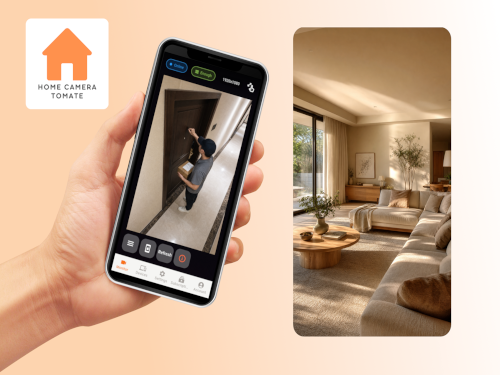
Tomate Camera
Place a spare phone where you need it and make everyday care and away-from-home checks easier.
Before heading out, set up a spare old phone in the entryway or living room as a camera
No one to watch the kids? Keep an eye on your baby from another room
Worried your pet will get into trouble while you are away? Check in anytime
Aging parents at home? Check on their wellbeing anytime while respecting privacy
Away on a long trip with no one home? Check your house anytime
Tomate Camera is more than a basic camera — these thoughtful extras make remote monitoring easier and more reassuring.
Simply scan a QR code to connect two phones — one becomes the camera, the other handles remote viewing. Watch your home from anywhere on your phone.
Tomate Camera uses encrypted connections to protect your video streams and personal information, keeping every monitoring session private and secure.
When the camera detects movement, it starts recording immediately and sends an instant notification to the viewer.
See whether your family members have checked in today, right from your phone, and stay updated on their status in real time.
Enjoy instant, seamless two-way audio for real-time conversations.
Adjust the camera’s zoom and focus remotely from the viewer phone for a clearer view.
Connect anytime and record the moments you need directly to your phone.
Every event is automatically saved to the cloud.
Recordings can be set up to save automatically to the cloud, keeping your footage secure and accessible anytime through the Tomate Camera app.
Available in English, Hindi, Spanish, Portuguese, Bahasa Indonesia, Arabic, Bengali, Russian, Turkish, Vietnamese, Urdu, Japanese, Korean, German, French, Italian, Traditional Chinese, Simplified Chinese and Thai.
Tomate Camera
Think a security camera is too expensive? The $25 Basic subscription supports three camera devices and cloud storage. Reusing old phones avoids buying dedicated hardware for every location.
Actual costs vary by hardware, storage plan, taxes and exchange rates.
Cost comparisonTomate Camera
Reuse spare phones and reduce hardware costs
Extend device life and reduce electronic waste
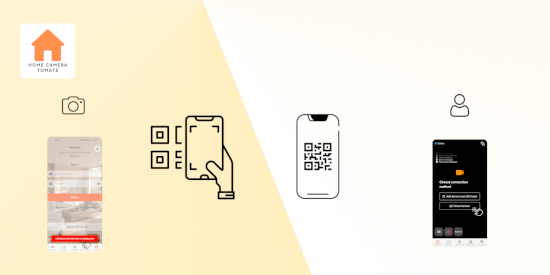
Pair by QR code in about one minute
Tomate Camera
Prepare two phones and choose Monitor or Viewer on screen.
On the first phone, select Viewer and register an account to get a QR Code
On the second phone, select Monitor and open the scanner
Scan the QR Code to finish pairing
If you sign in directly with Google / Apple, make sure to use the same account on both phones
Tomate Camera
Before a business trip or long vacation, mount a spare phone in the entryway or living room as a camera. Use Tomate Camera on another phone to check your home anytime, even during long absences.
Set up Tomate Camera with a spare phone in a shared space like the living room, so you can check on your parents anytime while respecting their privacy, and notice issues early.
While at work or traveling, turn a spare phone into a pet camera with Tomate Camera to check on your pet anytime and catch unusual behavior, like chewing on things, early.
Even for a short errand, use another phone with Tomate Camera to check on the kids at home anytime — far more reassuring than having no way to check at all.
No need to buy a dedicated camera. Use a spare phone you already own with Tomate Camera. The subscription is just US$25 a month for three devices and cloud storage, saving about US$365 compared to buying three dedicated cameras.